Why AI Clipping Tools Suck (and What Would Actually Fix Them)
A podcast producer tested a pile of AI clipping tools and asked if the problem was them. We read the thread: 24 people, seven recurring complaints, and one fix eight of them landed on independently. Plus our own test — the same AI, run twice on identical input, changed about one clip in four.

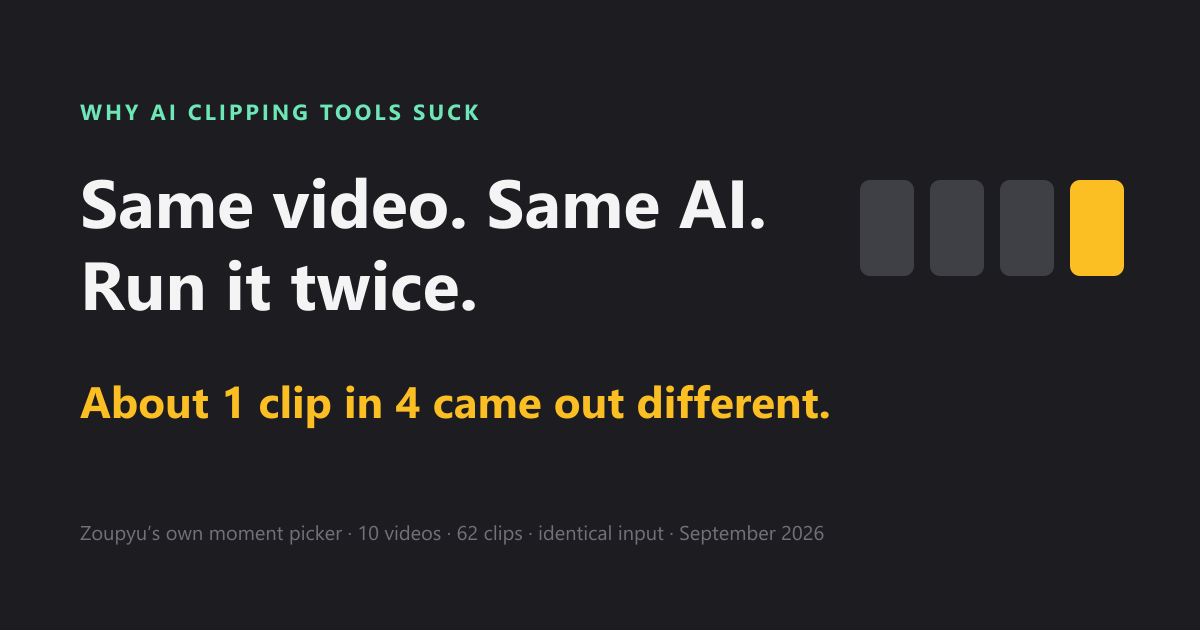
A podcast producer on r/podcasting tested a stack of AI clipping tools and asked a blunt question: are the tools bad, or am I? Ninety-two comments later the answer is fairly clear, and it isn't the producer.
We read the thread closely because we build one of these tools. This post is what the thread says, why it keeps happening, and what would actually close the gap between an AI that finds clips and a person who knows which ones are good. It is not a ranking. It is also not neutral: Zoupyu is an AI clipper, and we say exactly where we stand near the end.
What did people actually say?
We went through 32 of the thread's 92 comments, from 24 different people, and sorted every complaint. The chart counts people, not comments, so someone who made the same point twice counts once.
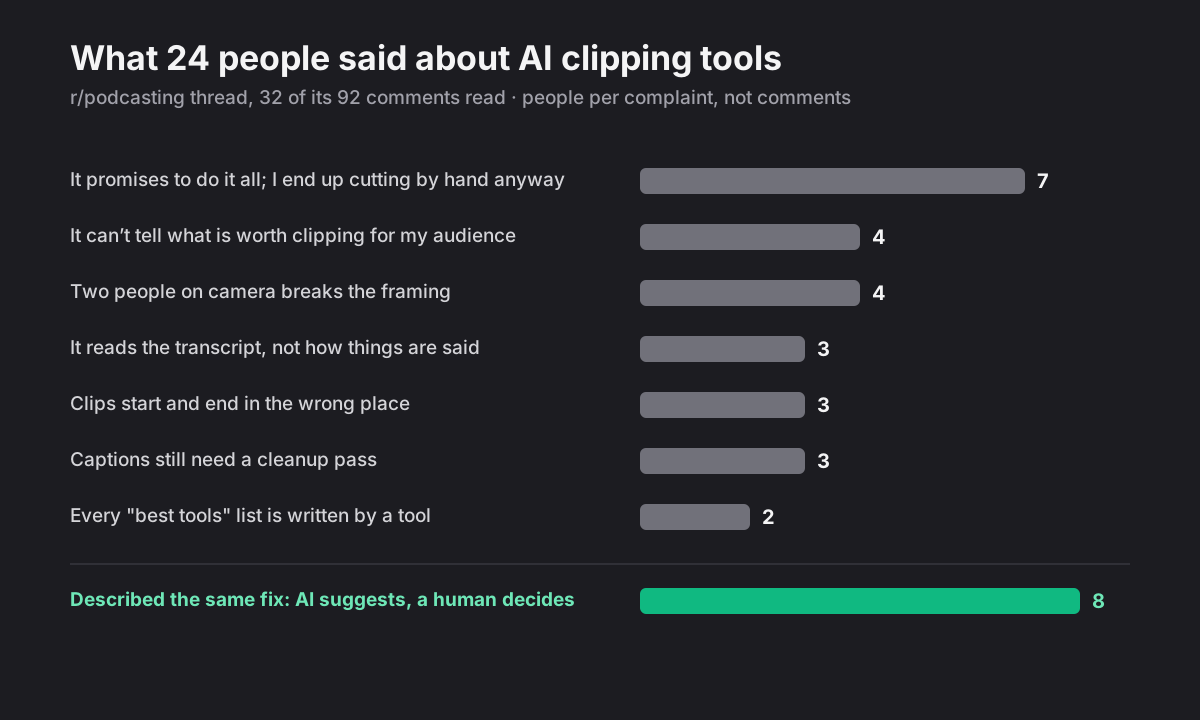
Two things stand out. The biggest complaint isn't a missing feature, it's the promise: seven people said some version of "it claims to do it all, and I end up cutting by hand anyway." And the most common workflow in the thread wasn't a complaint at all. Eight people, independently, described the same fix.
1. "Fully automated" is the wrong promise
Every tool the producer tried sold the same thing: no editing, the AI does it all. Every time, they ended up back in their editor, cutting by hand. Another commenter put it as hours spent training a tool that still couldn't do what takes them thirty seconds manually.
Automation isn't the problem. The problem is what gets automated. When a tool takes every decision away from you, every wrong decision becomes yours to undo, usually in a different app. The tool saved you the easy part (rendering) and kept the hard part (judgment) for itself.
2. The AI can't tell what's worth clipping
This was the deepest complaint. One experienced editor made the point that once you know which segment to cut, turning a raw minute into a tight 45-second clip takes three to five minutes. Finding that segment is where all the value is, and it's exactly what the tools are worst at.
The reason came up again and again: the AI sees one episode and nothing else. Not the show's history, not its running jokes, not who the audience is or what they reacted to last month. A commenter who built their own clipping tool said that trying different models and different prompts never fixed it. The model simply doesn't know what will land with your audience.
We measured how much an AI's taste is worth
We ran this test on our own moment picker in September. Same video, same section, same settings, byte-identical input, run twice. It picked the same moment 72.6% of the time. With nothing changed at all, about one clip in four came out different (10 videos, 62 clips, all under 15 minutes). When it did agree with itself, the clips lined up almost exactly, so the rest isn't jitter at the edges. It's a genuinely different pick.
If an AI disagrees with itself one time in four, its picks aren't judgment. They're good guesses. Good guesses are useful, because they save you two hours of scrubbing. But they mean the final call can't sit with the model.
3. A clip is how something is said, not just what
The producer added something that most tools ignore: a good clip depends on how a line is delivered. How punchy the sentence is. Whether people are talking over each other. Most tools decide from the transcript, and a transcript has the words and none of the delivery: the pause before the punchline, the laugh, the crosstalk. Two other commenters, one of them building a competing tool, made the same point. The AI is reading the episode, not watching it.
4. Clips start and end in the wrong place
Even when the moment is right, the edges often aren't. One commenter called abrupt starts and endings a problem across every product they'd tried. Another said multi-camera cuts butchered the timing badly enough that they gave up on standard clippers.
We see why in our own numbers. When we fed our picker a different transcript of the same video, it mostly chose the same moments, but their edges moved by about 2.8 seconds at the median. That's roughly one sentence, which is precisely the size of a missing setup or a clipped payoff. Edges are the most fragile thing an AI produces, which is a strong argument for letting a person set them.
5. Captions still need a cleanup pass
Crosstalk, names, show-specific terms: every transcript gets some of them wrong. One commenter pointed out that some tools let you keep a dictionary of names that are usually misspelled. The cleanup pass itself isn't the problem. The problem is when the only place to do it is after the captions are already burned into the video.
6. Two people on camera is where it falls apart
Vertical framing that follows whoever is talking came up as the point where every tool breaks. One commenter called it legitimately unsolved at the consumer level: most tools crop a finished file and guess who is speaking from the audio. The founder of a podcast hosting service described adding rules like "don't switch speakers too often", because a crop that jumps on every interjection is unwatchable. A third suggested the honest fix for many shows is upstream: switch cameras while you record, so the clip is framed before it ever reaches a clipping tool.
7. Every "best tools" list is written by a tool
The producer's last complaint: nearly every "best clipping tool" list is published by a clipping tool. That's true, and this post is published by one too. It's why we aren't ranking anything here, and why the section about us lists what we haven't built as well as what we have. Our own comparison of nine clipping tools dates every price and says where each rival wins.
What do the people who are happy actually do?
Eight people described what works for them, or what they are building because nothing else did. In different words, it is the same workflow:
- Let the AI suggest quotes and timestamps, then cut the clip by hand.
- Use the AI's rough cut as a starting point. Even at 80% accuracy, it beats scrubbing two hours of audio from scratch.
- Mark moments while recording (a note, a clap), transcribe, ask an AI for candidates, then edit by text.
- Build a tool that offers both: picking clips by hand and the AI's automatic picks.
- Describe the moment you want, review what matches, and only then make the clip.
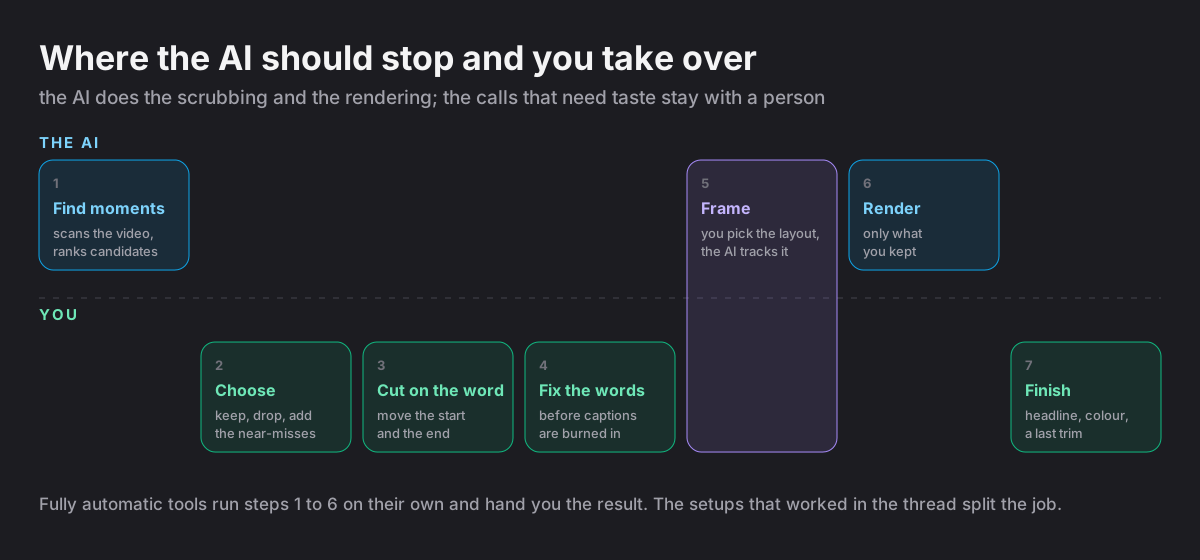
The few people who were happy with a single tool mostly praised what it let them edit, not what it picked. And every setup described in any detail splits the job the same way: the AI scouts, the human chooses and cuts.
What would actually fix AI clipping?
Put the thread's complaints next to its working setups and the fixes are fairly concrete. None of them require a smarter model. They require a tool that hands decisions back.
- The AI scouts, you decide. Show the candidates before rendering anything, and render nothing a person didn't keep.
- Show the near-misses. The model's eleventh pick is often your first. A tool should show what it ranked lower, not just its top ten.
- Set edges on the word. Start and end should snap to sentences and move in small steps, not be re-rolled by the AI.
- Add the line before, keep the line after. Most bad clips are missing a setup or a payoff one sentence away. Pulling in the neighbouring line should take one tap.
- Fix the words before they're burned in. Correct the transcript first, then render.
- Let people describe what they want. "Every time she roasts her co-host." Models are good at searching; let people point them.
- Give the AI context. The show, the audience, last month's winners. One episode is too little to judge from.
- Framing that knows who's talking, or gets out of the way. When the AI can't follow two speakers well, let the person choose the layout.
- Edit after, without leaving. A headline, a colour fix or a last trim in the same place the clip was made.
Where is Zoupyu on this?
We build an AI clipper, and the idea behind it is the thread's conclusion: only a person knows what will land with their audience, so the AI should do the scrubbing and hand the calls back. Here is where we stand against that list today, including the parts we haven't built.
| What would fix it | Zoupyu today |
|---|---|
| The AI scouts, you decide | Yes. It finds the moments and stops; nothing renders until you keep it |
| Show the near-misses | Yes. The extra moments it ranked lower are there to switch on |
| Set edges on the word | Partly. Edges snap to sentences and move by a tenth of a second; not word by word |
| Add the line before or after | Yes. Tap a transcript line just outside the moment to pull it in |
| Fix the words before they're burned in | Yes. Tap any word to fix it; the captions burn your version. No saved dictionary of names yet |
| Let people describe what they want | Not yet |
| Give the AI context about your show | Not yet. Every video is judged on its own |
| Framing for two speakers | Partly. The Podcast layout follows whoever is talking and only swaps after a new voice holds for 1.2 seconds, but it is one layout per video, with no locked two-shot |
| Edit after, without leaving | Yes. Headline in 13 fonts (or AI-drafted options), filters, colour adjustment |
On "reading, not watching": our picker reads the transcript and, on YouTube videos, the most-replayed data. On footage with no speech it falls back to audio energy, scene cuts and a vision pass over the frames. It still doesn't hear delivery the way you do. That gap is exactly why the choice stays with you.
For streams, where the speaker is usually a webcam in the corner, the Facecam layout puts the cam in its own band at the size you choose, from 30% to 50% of the frame, and gives two streamers on cam a band each. Here is how the cam detection works, including where it fails.
How do you judge any AI clipping tool, including ours?
- Before anything renders, can you see the AI's picks and reject them?
- Can you see what it ranked lower, not just its favourites?
- Can you move a clip's start and end without generating it again?
- Can you fix a caption word before it's burned in?
- Did you test it on your hardest episode (two speakers, crosstalk, a long setup) rather than the demo?
- Is the comparison you're reading written by one of the tools? (This one is.)
The tools in that thread didn't fail because AI is useless at clipping. They failed because they asked the AI to make the one decision it is worst at, and took it away from the one person who is good at it. If you want to see the other version, where the AI scouts and you decide, Zoupyu is built for clippers and the first three videos are free.
Source: I've tested a pile of "AI" clipping tools and they all kind of suck, r/podcasting. We read the post and 32 of its 92 comments on 17 October 2026. Commenters are paraphrased, not quoted, and not named.
Frequently Asked Questions
Because they judge from one episode, usually from its transcript, with no idea who the audience is or what has worked for the show before. They read the words but not the delivery: the pause, the laugh, the crosstalk. They are also less consistent than they look: our own moment picker, run twice on identical input, chose the same moment 72.6% of the time, so about one clip in four changed with nothing changed.
They are good at the scrubbing: finding candidate moments in a long recording far faster than a person can. They are bad at the final call. The setups that work, according to the people in the r/podcasting thread we read, all split the job: the AI suggests moments or timestamps, and a person chooses, trims and finishes the clip.
Use a tool that lets you move the edges before rendering rather than regenerating the clip. Snapping edges to sentence boundaries and pulling in the line just before or after the moment fixes most clips, because a bad clip is usually missing a setup or a payoff about one sentence away. In our own data, edges were the most fragile part of an AI pick: a different transcript of the same video moved them by about 2.8 seconds at the median.
Partly. Tools that follow the active speaker exist, but switching too often is unwatchable, so they need rules such as holding a speaker for a moment before cutting away, and most still guess the speaker from audio on a finished file. For many shows the most reliable fix is upstream: switch cameras while recording, so clips arrive already framed.
Vedansh Chauhan
Vedansh is the founder of Zoupyu, a tool that turns long videos into viral Shorts. He writes about YouTube growth, the creator economy, and what actually works on the algorithm.
Turn your long videos into viral Shorts
Upload once, get 5–10 ready-to-post clips with Hinglish subtitles in minutes.