How Zoupyu Finds Your Facecam (Even When It Has No Border)
Most clip tools crop facecams out of gameplay footage or stretch them into mush. Here's the actual pipeline we ship — border scans, corner probes, cluster fallbacks, and the one bug that made it to production anyway — with the real thresholds, not marketing hand-waving.

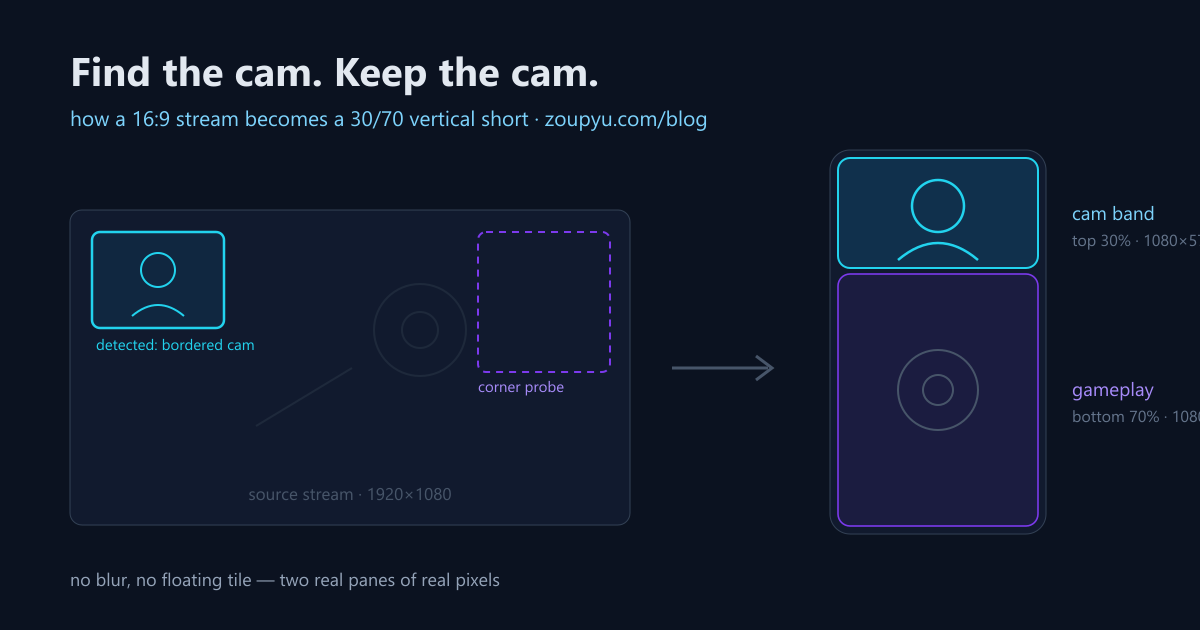
When you turn a gameplay VOD into a vertical short, the facecam is the whole ballgame. It's where the reaction lives — the jump scare face, the disbelief, the scream. Most tools either crop it out entirely (goodbye, reaction) or grab a face-shaped square and stretch it into a smear. We spent weeks getting this right, shipped it, found an embarrassing bug on real footage, and fixed that too.
This post is the actual pipeline — with the real thresholds from the code, because "our AI finds your webcam" is marketing, and engineering is more interesting.
Why did face detection alone keep failing?
The obvious approach — run a face detector, cluster the detections, call the densest cluster the facecam — is what we shipped first. It failed in three distinct ways on real streams:
- Clusters split. A streamer shifts in their chair over a 20-minute session, and what should be one cluster of face detections becomes two half-weight clusters — each too weak to beat a random in-game face on a billboard.
- Small cams starve. A 240-pixel-wide webcam in the corner of a 1920px frame gives the face detector almost nothing to work with. Some sessions produced near-zero detections inside the actual cam.
- Games contain faces. NPCs, cutscenes, kill-cam portraits — a face detector doesn't know the difference between your face and Arthur Morgan's.
The fix wasn't a better face detector. It was noticing that we were detecting the wrong thing entirely.
What pixel signature do webcam overlays have?
A webcam overlay isn't just a region with a face in it — it's a rectangle drawn on top of the game. It has borders: long, straight, static edges that sit in exactly the same pixels frame after frame while the gameplay behind them churns. No face cluster can fake that, and no game element reproduces it reliably.
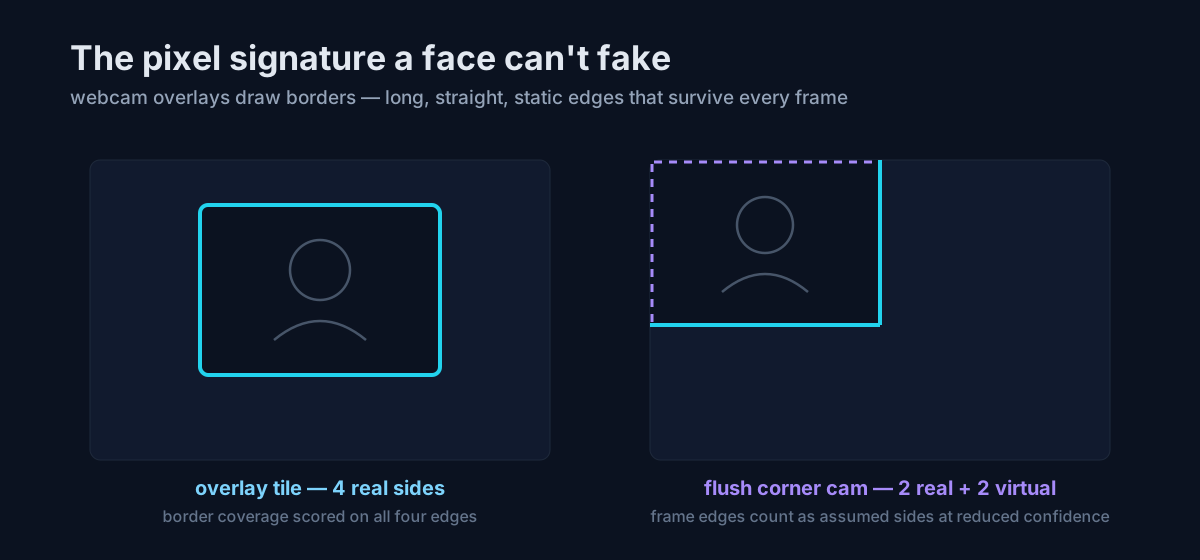
So the detector scans rows and columns of the frame for those edges, with tolerances tuned to reality: borders survive a couple of missing pixels (video encoders smear hard edges, and rounded tile corners jitter the line), a candidate tile has to land in the believable size range — webcam tiles typically run 12–25% of source width, and anything covering more than ~22% of the frame is rejected as "that's not a cam, that's the game" — and a cam sitting flush against the frame edge gets its missing sides counted as virtual at reduced confidence, as long as at least two real border sides exist.
How does the candidate cascade work?
Borders find overlay tiles. But plenty of streams have no borders at all — greenscreen streamers composited straight into the game, or a borderless room-cam. So the border scan is only the first source of candidates:
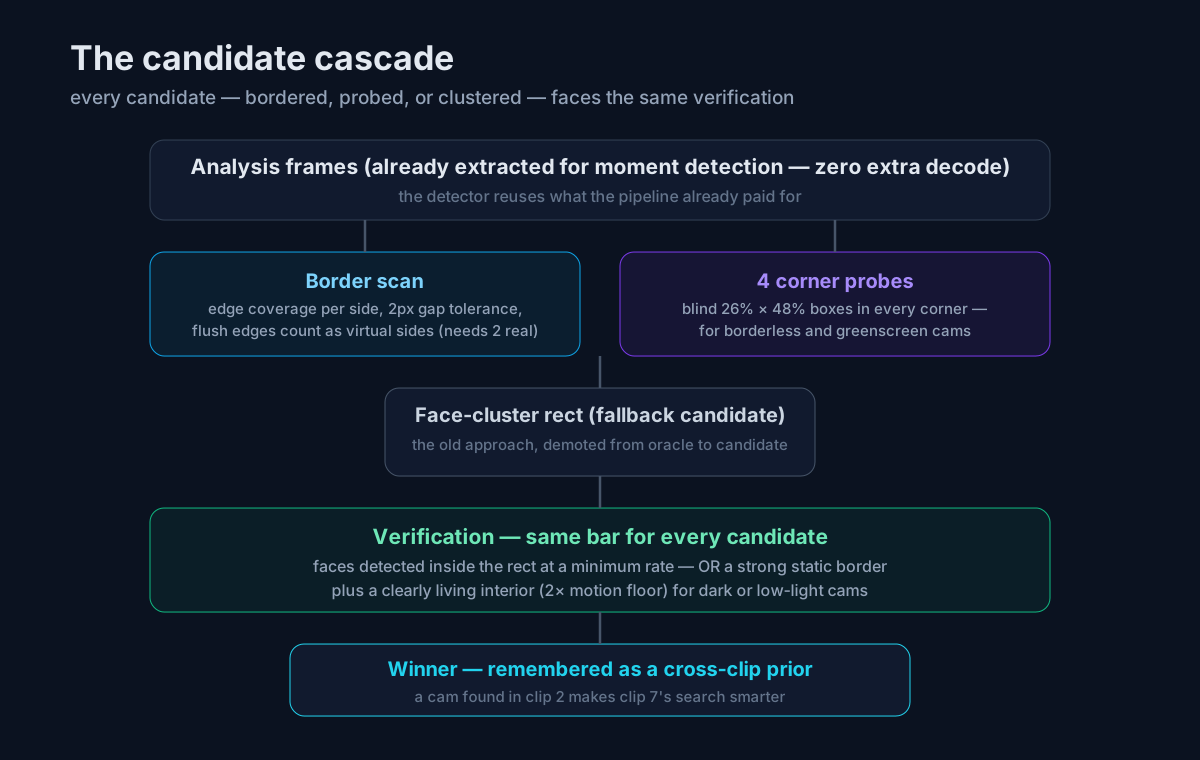
- Border scan — the pixel-signature search above, up to 8 best-scoring rectangles.
- Four corner probes — blind candidate boxes (26% of frame width × 48% of height) dropped into every corner, because that's where cams live. This is what catches greenscreen and borderless cams that have no edge to find.
- The face-cluster rect — the old approach, demoted from oracle to candidate. It proposes a box around the densest face cluster like everything else, and gets verified like everything else. The "just trust the cluster" shortcut is gone.
The crucial design rule: every candidate faces the same verification. A candidate wins by having actual faces detected inside it at a minimum rate across the clip's analysis frames. And because streamers play in the dark with moody RGB lighting, there's a relaxation: a candidate with a strong static border and a clearly living interior — interior motion at least twice the baseline floor, measured well inside the border so the border itself can't vote — can pass with a lower face rate. That's the dark-cam gate: the border proves it's an overlay, the motion proves someone's home.
Two stability details that matter on long VODs: an incumbent cam keeps its seat unless a challenger beats it by a clear margin (hysteresis — no flip-flopping between two plausible corners mid-video), and every verified cam is remembered as a cross-clip prior — the cam we confirmed in clip 2 makes clip 7's search start from evidence instead of zero.
What bug shipped anyway?
Honesty section. The day this went live, one streamer's clips looked perfect and another's were mixed — some clips filled the cam band beautifully, others showed the streamer with a slice of their room and game UI leaking in beside them. Same feature, same day, opposite results.
The cause: bordered cams produce a rectangle — crop the rectangle, fill the band, perfect. Borderless cams produce only a verified face position, and that position was falling through to an older code path that built a crop box 4.2× the face width with a floor of 30% of source width — 576px minimum. A typical borderless webcam view is ~480px wide. The floor made the crop wider than the cam itself, so it scooped up whatever was next to the streamer. And because border detection runs per clip on that clip's lighting and contrast, the same video could produce rect-clips (perfect) and face-clips (leaky) side by side.
The fix was a dedicated face-anchored crop for rect-less cams: 3.2× the face width, bounded to 8–40% of source width — deliberately the same multiplier and bounds the detector itself uses when it hypothesises a borderless cam's extent from a face cluster. Same geometry assumptions at both ends of the pipeline, so they can't disagree. In the repro, the crop went from 576×307 pixels (96 of them outside the streamer's room) to 256×137, fully inside the cam view.
We're writing this up because the failure mode teaches the design: detection isn't one clever trick, it's a system of candidates, verifications, and matching assumptions — and the bugs live wherever two components quietly assume different things.
How does detection become the 30/70 layout?
Once the cam is found, the layout is deliberately simple: the cam fills the top 30% of the vertical frame (1080×576), gameplay fills the bottom 70% (1080×1344). Two real panes of real pixels, stacked — no blurred backdrop, no floating tile. It's the same proportion OpusClip's gameplay layout uses, and the same anatomy as our reaction layout flipped upside down, reframed so the action stays in the crop.
The honest tradeoff: giving the cam a full-width band means the gameplay pane shows a 868px-wide window of the 1920px source — about 45% of the horizontal field of view, versus 56% for the old floating-tile design. That's inherent to the format, not a bug: every gaming layout trades field of view for reaction visibility. We think the trade is right because the reaction is why anyone clips with a facecam at all — and the viralometer data backs the intuition that emotional payoff drives scores.
What is still imperfect?
Small cams get upscaled. A 256px-wide face crop stretched across a 1080px band is visibly softer than a large bordered rect. There's a single tuning dial for how tight the face crop runs, and physics doesn't offer a free lunch: you can have a tight crop that upscales more or a loose crop that risks including the room. We chose tight. If your cam is large or bordered, you'll never notice; if it's a small borderless room-cam, that softness is the current honest limit of the system.
All of this runs automatically on every gaming upload — try it with your own VOD on the gameplay-to-shorts flow, or paste a Twitch VOD link and check whether we found your cam. If we didn't, that's a bug report we genuinely want.
Frequently Asked Questions
Yes — that's what the corner probes exist for. Four blind candidate boxes (26% of frame width × 48% of height) are dropped into the corners and verified by face rate and interior motion like every other candidate. Borderless cams are framed from the verified face position with a crop bounded to 8–40% of source width. The one limitation: small borderless cams upscale more and can look softer than bordered tiles.
The layout falls back gracefully: gameplay is framed as a centered vertical crop with subject tracking following the action instead of splitting the frame into cam and game panes. Silent gameplay with no commentary still gets clipped — moment detection falls back to audio-energy spikes, scene cuts, and AI vision when there's no transcript.
Detection runs per clip, so a cam that moved between segments is re-found for each clip. Within a clip, an incumbent cam keeps its position unless a challenger beats it by a clear margin — hysteresis that prevents flip-flopping between two plausible corners. Verified cams also carry forward as priors, so later clips start their search from earlier evidence.
Three reasons: the cam is large enough to actually read emotion on a phone screen; both panes are real pixels with no blurred filler; and it matches the proportion viewers already know from the biggest clip tools. The cost is horizontal field of view in the game pane — about 45% of the source width is visible — which is the inherent trade of every stacked gaming layout.
It's game-agnostic by design. The detector looks for the pixel signature of a webcam overlay — static rectangular borders, faces, interior motion — not for any specific game's UI. It was validated on RDR2 and IShowSpeed-style streams, and the same pipeline handles any 16:9 gameplay recording with or without commentary.
Vedansh Chauhan
Vedansh is the founder of Zoupyu, a tool that turns long videos into viral Shorts. He writes about YouTube growth, the creator economy, and what actually works on the algorithm.
Turn your long videos into viral Shorts
Upload once, get 5–10 ready-to-post clips with Hinglish subtitles in minutes.